
Posting videos
- Chris CW
-
 Topic Author
- Offline
- Owner / Admin
-

Less
More
17 years 4 months ago #11868
by Chris CW
Posting videos was created by Chris CW
A new option called 'video' has been added, this lets you add youtube, googlevideo, dailymotion, metacafe. myspace, starsclips, yahoo, photobucket, filefront, stage6, veoh, vidilife, gametrailers, vidiac, gamespot, megavideo, vimeo, gamevideos, tu.tv and godtube videos to your post so they appear directly on the page.
Use them exactly the same way as you would the image tag
Copy (Ctrl+C) the videos web address (example from YouTube)
Paste (Ctrl+V) the web address into your post, then highlight it

Once hightlighted, click the video button.
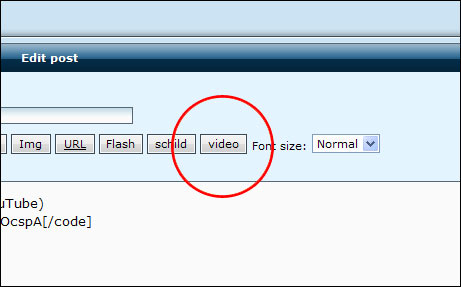
Then thats it! It will now display the video inside the forum. The code will look like this;
The video appears like this;
Use them exactly the same way as you would the image tag
Copy (Ctrl+C) the videos web address (example from YouTube)
http://uk.youtube.com/watch?v=8EVDCbOcspAPaste (Ctrl+V) the web address into your post, then highlight it
Once hightlighted, click the video button.
Then thats it! It will now display the video inside the forum. The code will look like this;
[video]http://uk.youtube.com/watch?v=8EVDCbOcspA[/video]The video appears like this;
Please Log in or Create an account to join the conversation.
- Chris CW
-
Topic Author
- Offline
- Owner / Admin
-
17 years 2 months ago #24440
by Chris CW
Replied by Chris CW on topic Posting videos
UPDATE: SIMPLY POST THE VIDEO LINK NOW, IT WILL AUTOMATICALLY BE ADDED (EMBEDDED)
Please Log in or Create an account to join the conversation.